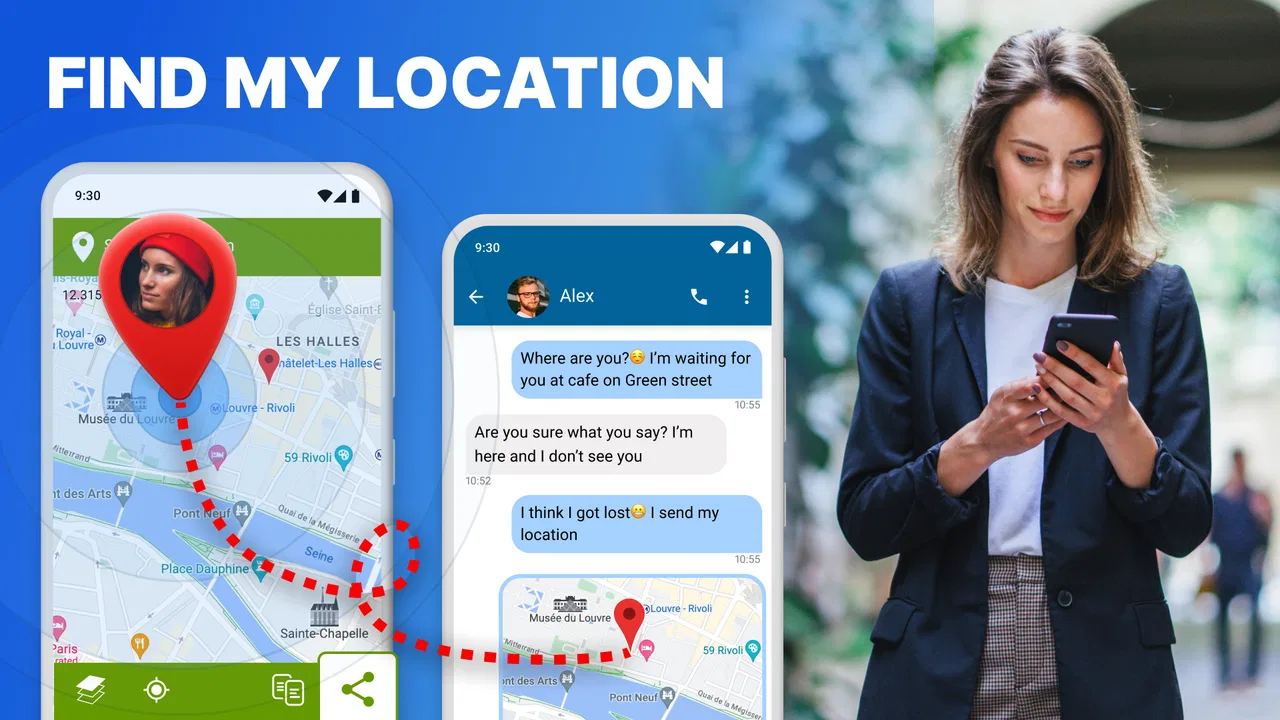
Send My Location - GPS Tracker
- 4.5
- Rating
- 1.00M
- Installs
- Free
- Price

 Analysis by App-foxy
When someone asks me to share my location, I usually do not want a full navigation app, a social map, or a long setup process. I want one clear result: my current GPS position should reach the other person quickly. Send My Location - GPS Tracker is built around that narrow need, and that focus is both its main attraction and its biggest limitation.
I reviewed it as a lightweight Maps & Navigation app from o16i Apps. Its purpose is easy to understand from the first moment: send your present location instead of asking someone to interpret a street name, landmark, or confusing description. The app is free to install, aimed at Everyone, and works on Android devices running version 5.0 or later. That combination makes it accessible to people using older phones as well as newer ones.
The app has reached over one million installs and holds a 4.5 average from around eleven thousand ratings. Those figures suggest that the simple idea works for a substantial audience, but they do not change what the app is designed to do. This is not a replacement for a complete navigation service. I see it as a focused utility for communicating where I am with as little friction as possible.
You May Also Like

 Blood Strike: 2.5 Anniversary
Blood Strike’s Loadouts Turn Every Drop Into a Tactical Gamble
A close look at Blood Strike’s custom loadouts: how fast access to signature weapons reshapes its battle royale rhythm, rewards preparation, and narrows the gap between fights.

 Pandora - Music & Podcasts
Pandora’s Music Is Easy to Start, but Harder to Recover
Pandora’s strength is its low-effort path from a seed to a station. Its weak spot is how much confidence it asks you to place in connection, setup, and quiet recovery.

 8 Ball Pool
 Is Built on Rivalries, Rematches, and Routine
A close look at the rivalries, rematches, shared routines, and unanswered safety questions that turn a quick pool match into a persistent mobile community.

 Samsung Music
’s Quiet Strength Is Playing What You Already Own
Its reach comes less from spectacle than from dependable access to a personal library. That simplicity is both the app’s strongest retention engine and its ceiling.

 AccuWeather: Weather Radar
AccuWeather Review: A Quick, Clear Forecast for Everyday Decisions
For everyday plans, the best forecast is the one you can understand quickly. AccuWeather makes rain timing, radar, and local conditions easy to act on, with a few trade-offs.

 Hill Climb Racing
Why Hill Climb Racing Still Turns Crashes Into One More Run
A tiny car, a bumpy hill and one more upgrade: Hill Climb Racing keeps resurfacing because its simple chaos makes every near-miss feel personal.
More From Our News Desk



How the simple location-sharing workflow feels in daily use
I find the appeal of a simple location-sharing workflow clearest when I’m coordinating a real meeting: the pin can get someone close, while a brief note can explain which entrance or landmark to look for. That combination also makes it easier to judge when a single location is enough and when I’d rather use an ongoing sharing option. The next section looks at how that focused approach compares with familiar map and messaging tools.
A focused tool instead of a full navigation platform
The first thing I appreciate is the lack of ambition. Many familiar map apps try to handle directions, traffic, saved places, business searches, public transport, reviews, and live movement. That can be useful when I am planning a trip, but it is unnecessary when a friend is already waiting for me and only needs my position.
This app fits the second situation better. I can think of it as a small communication tool attached to the phone's GPS rather than as a map service I would open for every journey. That distinction matters. If I need turn-by-turn guidance, route alternatives, or a detailed view of nearby businesses, I would choose a conventional mapping app. If I need to send where I am now, the narrower design is easier to understand.
The store summary describes it as a simple way to send a GPS location, and that simplicity is genuinely important. A location pin is more useful than a vague message such as “I am near the station,” especially in crowded areas, large parks, shopping centers, or unfamiliar neighborhoods. It also reduces the number of questions that follow: which entrance, which side of the road, or which building?
A realistic example: meeting someone in a busy place
Imagine I arrive early at a large outdoor market. The person I am meeting is somewhere nearby, but the market has several entrances and the surrounding streets look similar. Instead of writing a long explanation, I can use the app to send my current GPS location. The other person receives a more precise starting point and can decide how to reach me using the map tools already available on their phone.
That workflow is especially helpful when I am walking, cycling, visiting a new area, or waiting outside a building whose official address covers more than one entrance. It is also useful for a family member who wants to know where I am during a journey without needing to learn a new social platform or join a shared map group.
There is a subtle advantage here: sending a single current position is less demanding than maintaining a live location session. I do not need to keep a tracking screen open simply to communicate one moment in time. For a quick meeting, that is often the right level of sharing. It gives the recipient a useful point without turning a simple request into an ongoing location-management task.
What I would check before pressing send
GPS is only as helpful as the surroundings allow. Indoors, between tall buildings, underground, or in areas with a weak signal, the position may be less precise than expected. I would pause for a moment if the location appears to be drifting or obviously placed on the wrong street. Sending immediately is convenient, but sending a stale or inaccurate point can create more confusion than a short written explanation.
I would also confirm the recipient before sharing. A location message is personal information, even when it is only a single point. The app's value comes from making sharing easy, so the user still needs to supply the judgment about who should receive it and whether sharing right now is appropriate.
Useful habits that make the app more dependable
My first practical tip is to open the app before walking away from a recognizable landmark. If I am about to enter a large venue or a poorly marked trail, sending my position while the phone has a clearer view of the sky can create a better reference point than waiting until I am surrounded by walls or trees.
My second tip is to add a short human explanation when the location alone might be ambiguous. “I am at the north entrance” or “I am outside the café” can make the pin much more useful. The GPS point handles precision, while the sentence explains the context. Treating the app as a replacement for all communication is less effective than combining it with one informative line.
A third useful habit is to use it for a specific moment rather than assuming it is a safety-tracking system. A sent location is best understood as a snapshot. Someone who needs continuous updates during a long trip, a group outing, or an emergency plan may be better served by a service built specifically for live sharing and status updates.
Cost and what the free access means
The app is free to download, which makes trying the basic location-sharing workflow straightforward. I can evaluate whether it fits my routine without committing money first. That is a strong advantage for a utility whose usefulness depends heavily on personal habits: some people will use it every week, while others may only need this type of tool occasionally.
There are in-app purchases ranging from ninety-nine cents to ninety-nine dollars and ninety-nine cents per item. That range is important when judging value. The free entry point makes the app approachable, but I would not assume that every possible capability is included without checking the purchase screen inside the app. The existence of purchases means the practical value of any paid option should be judged separately from the free installation.
For me, the free access is the central reason to consider it. I would first test whether the basic action is reliable on my phone and whether the recipient can use the resulting location comfortably. Only after that would I consider paying for anything. A paid purchase could be worthwhile for a feature I personally use often, but the purchase range alone does not justify spending. The right question is whether a specific addition solves a recurring problem better than tools I already have.
Where it sits beside the usual alternatives
The most obvious alternative is a standard map app. Those services generally offer much broader capabilities, so they are the better choice when I need directions, route planning, traffic information, place discovery, or navigation while moving. They may also already be installed, which removes the need to add another utility.
However, broad functionality can make a simple task feel unnecessarily busy. A dedicated location sender has a clearer purpose: open it when the goal is to communicate a position. That can suit someone who does not want to search through a large map interface or explain which sharing option to choose.
Another alternative is a messaging app with built-in location sharing. That may be more convenient when the conversation is already happening there, particularly if the recipient needs to reply immediately. The trade-off is that the location feature can be buried among other message tools, and the exact sharing mode may vary between conversations. A focused app can be easier for a person who wants one direct action.
Live-location and family-safety services are different again. They are more suitable when several people need ongoing visibility, scheduled check-ins, or a shared safety routine. I would not choose this app as my only solution for those needs. Its strength is the one-time handoff of a current position, not a complete monitoring system.
Small friction points that affect the experience
The narrow purpose can feel limiting if my needs expand beyond a single location. I may still need another app to navigate to the pin, describe a meeting entrance, or continue communicating with the recipient. That is not necessarily a flaw, but it means the app works best as one step in a workflow rather than as an all-in-one travel companion.
Accuracy can also depend on the phone's GPS conditions. No simple location-sharing tool can make a poor signal behave like a perfect one. I would be cautious about using a freshly sent point as proof of an exact doorway when the phone is indoors or the surroundings block the signal.
There is also a difference between “send my current location” and “help someone find me.” The first is a clear action. The second may require navigation, a phone call, updated instructions, or another location later. Users who expect the app to manage the entire meeting process may find it too minimal.
Version 2.0.3 is the current version, and the app was released on August 13, 2017. Those details place it in the category of an established utility rather than a newly launched experiment. I would still keep my expectations practical: an established app can be convenient without offering the depth or polish of a large navigation ecosystem.
Who is most likely to get real value from it?
I think it suits people who regularly need to send a current position but do not want a complicated location-sharing routine. Parents coordinating a pickup, travelers meeting companions, cyclists arranging a stop, and friends trying to find one another at a crowded event are all plausible users. It can also help someone who struggles to describe unfamiliar surroundings in words.
It is a particularly sensible choice for a person using an older Android phone, since the minimum operating-system requirement is Android 5.0. The Everyone age rating also makes it broadly approachable from a content perspective. Still, age suitability does not remove the need to teach younger users when location sharing is appropriate and who may receive it.
I would skip it if I mainly want turn-by-turn navigation, live tracking, route planning, or a full family-location system. I would also skip it if my existing messaging or map app already sends a current position easily and I have no frustration with that process. Installing a separate tool only makes sense when the focused workflow is genuinely quicker or clearer for me.
My decision after weighing free use and paid value
My recommendation is cautious but positive: try the free version if your recurring problem is simply sending a GPS position. The app's strongest value is not a long feature list; it is the reduction of effort between “someone needs to know where I am” and “here is my location.” That is a real benefit in meetings, pickups, and unfamiliar places.
I would not buy an in-app item automatically. Because purchases can range from ninety-nine cents to nearly one hundred dollars per item, I would inspect exactly what a paid option provides and compare it with the map and messaging tools already on my phone. Free access is enough to decide whether the central workflow works for me, while paid value depends entirely on the particular addition and how often I need it.
In the end, I see Send My Location - GPS Tracker as a practical specialist rather than a complete navigation solution. It earns its place when simplicity matters more than breadth. If you want one current location sent with minimal fuss, it is worth testing. If you need continuous tracking, detailed directions, or a richer map experience, I would choose a broader alternative instead.
FAQs for Send My Location - GPS Tracker
01What is Send My Location - GPS Tracker used for?
Send My Location - GPS Tracker is designed to help users share their real-time location with friends and family. It is useful for coordinating meet-ups, ensuring safety during travel, and tracking the location of loved ones in real time. The app can also be used for business purposes, such as managing delivery routes.
02How accurate is the location data provided by the app?
The app uses GPS technology to provide highly accurate location data. However, the accuracy can vary depending on factors such as signal strength, geographic location, and weather conditions. Typically, users can expect a precision of a few meters, but urban environments with tall buildings may affect this accuracy.
03Is my location data secure when using the app?
Yes, Send My Location - GPS Tracker prioritizes user privacy and data security. The app uses encryption to protect data during transmission and does not share your location without your explicit consent. Users have control over who they share their location with and can stop sharing at any time.
04Are there any costs associated with using the app?
Send My Location - GPS Tracker is free to download and use for basic features. However, there may be optional in-app purchases or subscription plans available that offer additional features, such as enhanced tracking options or ad-free experience. It's best to check the app store description for detailed pricing information.
05Can I use the app without an internet connection?
While the app requires an internet connection to share real-time location updates, you can still access previously saved locations or maps offline. However, real-time tracking and sharing features will be inactive without a data connection. It is recommended to have a stable internet connection for optimal functionality.
Pros
- Easy to share location with friends.
- Real-time tracking is highly accurate.
- User-friendly interface for all ages.
- Low battery consumption during use.
- Supports both Android and iOS devices.
Cons
- Requires constant internet connection.
- Ads can be intrusive at times.
- Limited features in free version.
- Some features need in-app purchases.
- Occasional location update delays.

Send My Location - GPS Tracker
Gallery